使用淘宝随便买的调试器是不支持TD的调试的。它只能用来烧录FPGA。FD本质上是在调试ARM,而且使用了openOCD。原厂的方案是基于FTDI的,然后原厂的.cfg文件也是这个(位于/home/mingzai/Programs/FutureDynasty/toolchain/openocd/fpsoc/share/openocd/scripts/target/anlogic/dr1m90.cfg).
那么就真的只能用原厂的调试器才可以吗?并不是,因为它使用OpenOCD,而OpenOCD支持多种调试器,因此可用DAP Link来调试。这就要求我们修改.cfg文件:
1
2
3
4
5
6
7
8
9
10
11
12
13
14
15
16
17
18
19
20
21
22
23
24
25
26
27
28
29
30
31
32
33
34
35
36
37
38
39
40
41
42
43
44
45
46
47
48
49
50
51
52
53
54
55
56
57
58
59
60
61
62
63
64
65
66
67
68
69
70
71
72
73
74
75
76
77
78
79
80
81
82
83
84
85
86
87
88
89
90
91
92
93
94
95
96
97
98
99
100
101
102
103
104
105
106
107
108
109
110
111
112
113
114
115
116
117
118
source [find /home/mingzai/Programs/FutureDynasty/toolchain/openocd/fpsoc/share/openocd/scripts/target/anlogic/init.cfg] set CONFIG_TARGET_ARM 1 # 替换为 cmsis-dap 驱动 adapter driver cmsis-dap if {[info exists USB_LOCATION]} { adapter usb location $USB_LOCATION } if {[info exists JTAG_SPEED]} { adapter speed $JTAG_SPEED } else { adapter speed 10000 } transport select jtag if { [info exists CHIPNAME] } { set _CHIPNAME $CHIPNAME } else { set _CHIPNAME dr1m90 } if {$CONFIG_JTAG == 0} { jtag newtap $_CHIPNAME dummy -irlen 5 -ircapture 0x1 -irmask 0x03 jtag newtap $_CHIPNAME apu -irlen 4 -ircapture 0x1 -irmask 0xf -expected-id 0x5ba00477 -enable jtag newtap $_CHIPNAME rsv -irlen 4 -ircapture 0x1 -irmask 0xf jtag newtap $_CHIPNAME fpga -irlen 8 -ircapture 0xC5 -irmask 0xFF } elseif {$CONFIG_JTAG == 1} { jtag newtap $_CHIPNAME apu -irlen 4 -ircapture 0x1 -irmask 0xf -expected-id 0x5ba00477 -enable } pld device dr1_90 $_CHIPNAME.fpga target create $_CHIPNAME.pstap pstap -chain-position $_CHIPNAME.rsv if {$CONFIG_TARGET_ARM == 1} { echo "target arm" dap create $_CHIPNAME.dap -chain-position $_CHIPNAME.apu set _TARGETNAME $_CHIPNAME.core set _CTINAME $_CHIPNAME.cti set DBGBASE {0xF9010000 0xF9012000} set CTIBASE {0xF9018000 0xF9019000} set _cores 2 proc apu_reset {core_num} { global _TARGETNAME echo "Reseting: $_TARGETNAME.$core_num" catch "mww 0xf8806330 0x1f0" sleep 100 catch "mww 0xf8806330 0x1f0" sleep 100 } for {set _core 0 } { $_core < $_cores } { incr _core } { cti create $_CTINAME.$_core -dap $_CHIPNAME.dap -ap-num 1 \ -baseaddr [lindex $CTIBASE $_core] target create $_TARGETNAME.$_core aarch64 \ -dap $_CHIPNAME.dap -coreid $_core \ -dbgbase [lindex $DBGBASE $_core] -cti $_CTINAME.$_core $_TARGETNAME.$_core configure -event reset-assert-pre "halt" $_TARGETNAME.$_core configure -event reset-assert "apu_reset $_core" } } if {$CONFIG_FLASH == 1} { set _LOADER $_CHIPNAME.core.1 $_LOADER configure -work-area-phys 0x61000000 -work-area-size 0x40000 -work-area-backup 1 if {$CONFIG_QSPI != 0} { set _FLASHNAME $_CHIPNAME.flash flash bank $_FLASHNAME.0 dwcssi_90 0x00000000 0 0 0 $_LOADER 0xf804e000 if {$CONFIG_QSPI == 3} { flash bank $_FLASHNAME.1 dwcssi_90 0x02000000 0 0 0 $_LOADER 0xf804e000 } } if {$CONFIG_NAND == 1} { # nand config set _NANDNAME $_CHIPNAME.nand nand device $_NANDNAME smc35x $_LOADER 0xF841A400 } if {$CONFIG_EMMC != 0 || $CONFIG_EMMC1 != 0} { if {$CONFIG_DDR_EN == 1} { $_LOADER configure -ddr-enable 1 -loader-buf-start 0x6102D000 -loader-buf-size 0x40000 } else { $_LOADER configure -loader-buf-start 0x6102D000 -loader-buf-size 0x10000 } set _EMMC $_CHIPNAME.emmc if {$CONFIG_EMMC == 1} { # emmc config emmc device $_EMMC dwcmshc_90 $_LOADER 0xF8049000 0 ../loader/emmc } if {$CONFIG_EMMC1 == 1} { # emmc1 config emmc device $_EMMC.1 dwcmshc_90 $_LOADER 0xF804A000 1 ../loader/emmc } } } if {$REMOTE_DEBUG == 1} { bindto 0.0.0.0 } bindto 0.0.0.0
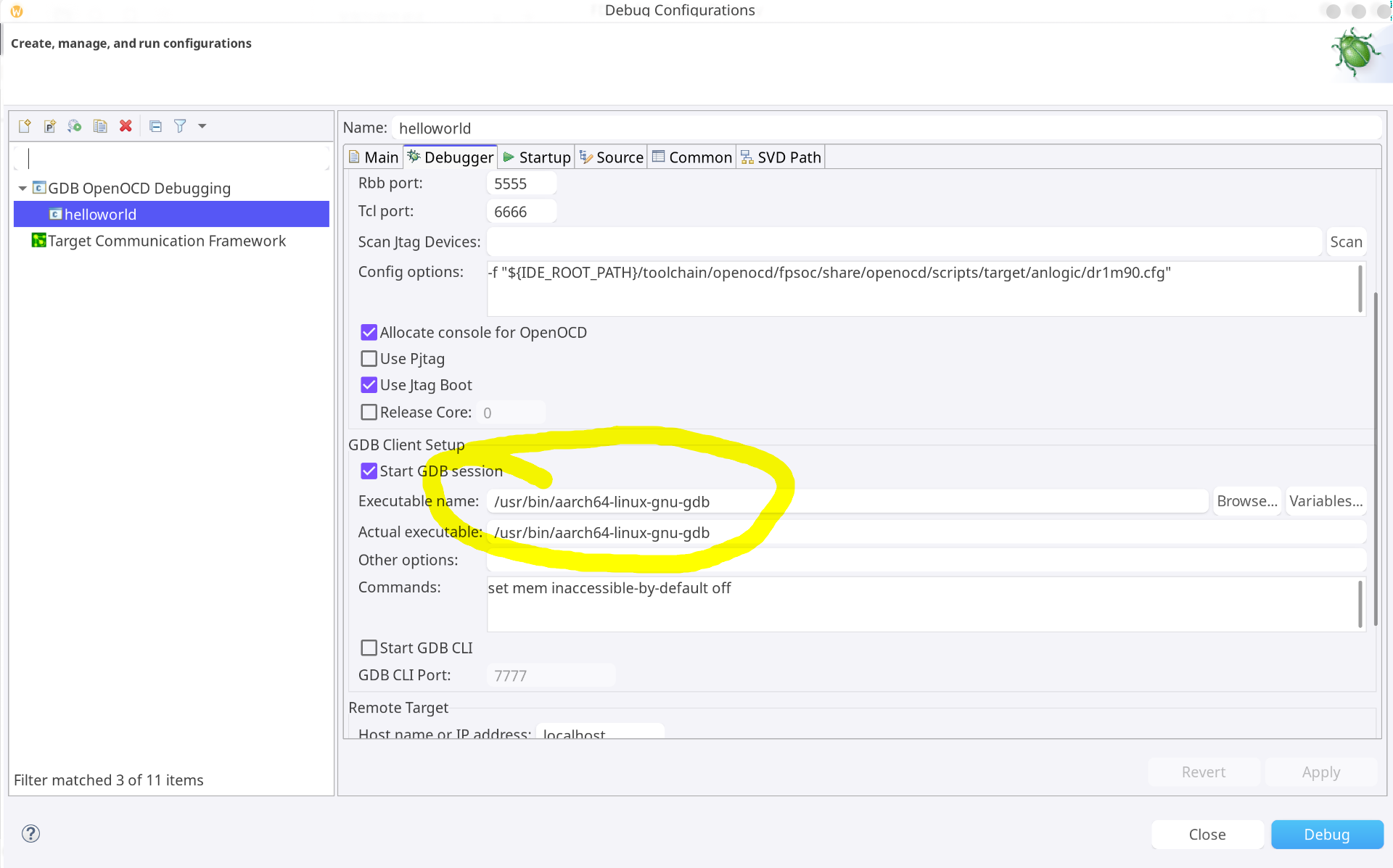
就只是更改了开头的几行。把原来的文件可以加.bak。另外,Linux下还有个问题是可能运行不了FD软件自带的GDB(依赖库老旧),因此可使用系统下载的GDB,配置为:
但是OpenOCD不能用系统下载的,必须用FD工具自带的(配置中默认的)。